You lead, it follows
You set the shapes and the key moments. Smart Roto fills the tedious middle, matching the way you already work.
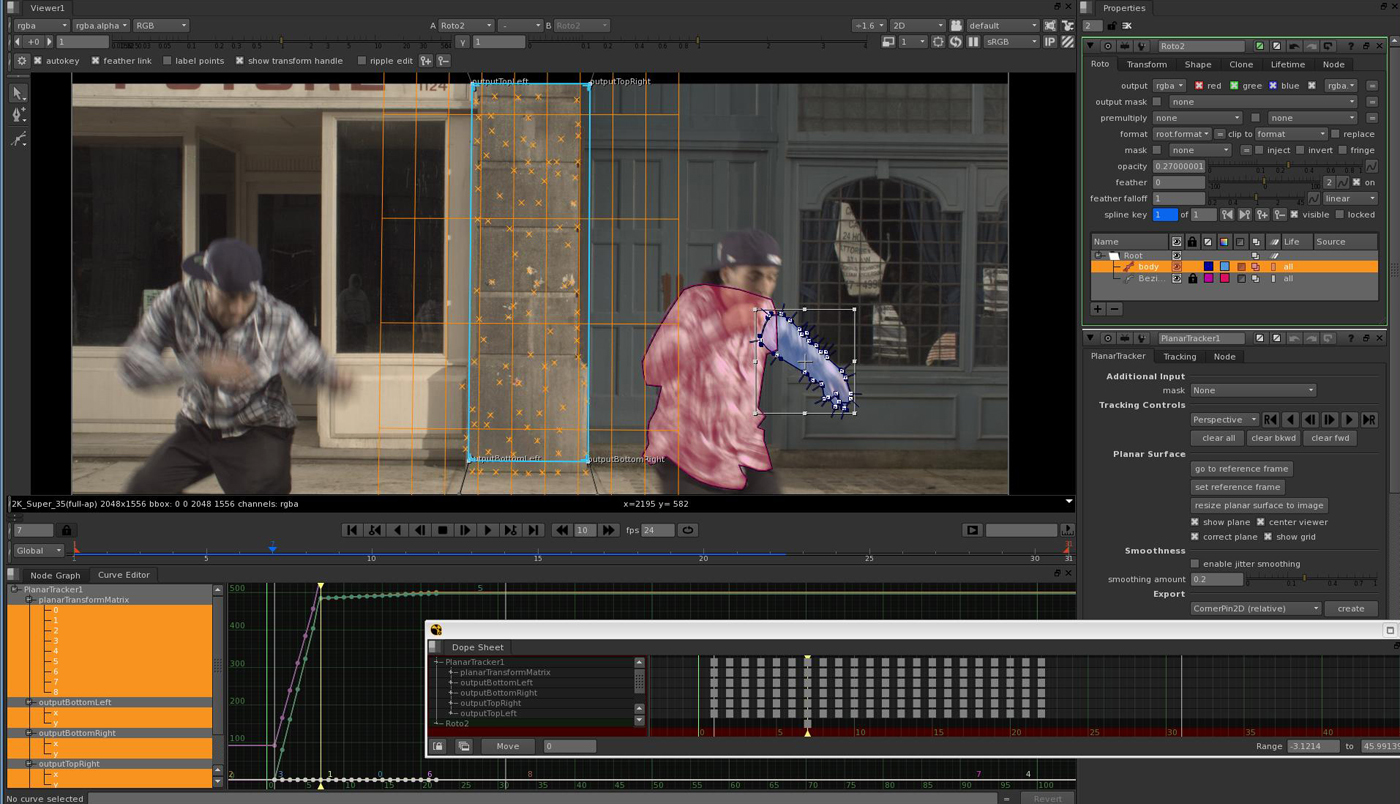
Smart Roto is an online, automatic rotoscoping tool that keeps every spline editable. Draw a couple of keyframes, our engine propagates the splines across the shot, and you export production-ready mattes up to 8K. All in the browser, no install, no workstation.



Smart Roto is automatic rotoscoping that keeps you in control: it takes the repetitive part of rotoscoping off your plate. Sketch your splines on a couple of frames and the engine walks them through the whole sequence, working out the in-between keyframes so you don't have to hand-tween every one. You stay in the driver's seat the entire time: review a frame, adjust a point, lock it, and keep going. It's an assistant, not an autopilot, nothing is a black box, and you never have to start over.
Watch the walkthrough
You set the shapes and the key moments. Smart Roto fills the tedious middle, matching the way you already work.
Every spline and keyframe stays yours to tweak, down to a single point on a single frame. No flattened, non-editable mattes.
Refine any frame and re-propagate just that range. Your earlier work holds, corrections build on it instead of resetting it.
The capabilities that make Smart Roto production-grade, not just another auto-matte demo.
The AI removes the tweening; you keep every creative decision. It works with how you roto, not around it.
Every shape and keyframe stays yours to adjust, down to a single point. Never a flattened, locked-in matte.
Motion blur, occlusion, hair and soft organic edges, the cases where one-click matte tools fall apart.
Full-resolution mattes with proper OCIO color, delivered as EXR that drops straight into your comp.
Footage and shapes are handled responsibly, with strict access boundaries. Your IP and data stay yours.
Cloud GPUs carry enterprise shot volume in the browser, no workstation, no install, no render queue.
From plate to production-ready matte in four steps, AI-assisted rotoscoping that predicts your in-between keyframes while keeping every spline in your hands.
Rotoscope the opening frame the way you always do, lay Bézier or B-spline shapes around your subject. There's no new tool to learn and no plugin to install.
Mark the frames where the motion changes direction. A handful of keyframes is all the model needs to understand how your shapes should move across the shot.
Smart Roto predicts every in-between keyframe across the sequence in seconds, tracking your splines frame by frame so the matte follows the subject cleanly.
Preview the matte in real time, adjust any point, and lock the frames you're happy with. Export editable shapes and EXR mattes straight into Nuke, Silhouette, or Fusion.
Trained on the difficult cases, not just clean, well-lit demos.
Soft, smeared edges that trip up hard-edged auto mattes stay clean and trackable.
Shapes that pass behind other objects hold their identity through the hand-off.
Fine, organic detail is preserved with both hard and soft matte channels.
Sudden direction changes are exactly where your keyframes and the model meet.
Every shape and keyframe is yours to edit, down to a single point on a single frame. Lock what's right, re-run what isn't. No flattened mattes, no black box, no starting over.
Your footage is yours. Shapes and plates are handled with strict access controls and clear data boundaries, so you can bring Smart Roto into a secured pipeline without a second thought.
Indicative targets, we'll validate the numbers on your own shots.
It took the grind out of the sequence, and I still shaped every edge myself.
 Alfie VaughanRoto Artist · Feature film
We keyed the tricky frames and let it carry the rest. The turnaround on the shot dropped by a third.
 Priya NairVFX Supervisor · Episodic
Splines came back editable and clean, straight into Nuke. No re-doing anyone's work.
 Marcus BellCompositing Lead · Commercials
Everything artists and studios ask about Smart Roto, how AI-assisted rotoscoping works, how much time it saves, and how it fits a professional VFX compositing pipeline.
Smart Roto is an online AI rotoscoping tool: automatic, artist-editable rotoscoping software for VFX post-production that runs in your browser. Instead of hand-keyframing a matte frame by frame, you draw your spline shapes on a few frames and Smart Roto propagates them across the entire sequence, predicting the in-between keyframes while keeping every shape fully editable. It runs on cloud GPUs, supports plates up to 8K, and exports editable splines and EXR mattes that drop straight into standard compositing tools, so you get the speed of automatic rotoscoping with the control of hand-crafted roto.
No, Smart Roto is designed to assist roto artists, not replace them. It automates the repetitive, time-consuming part of rotoscoping, propagating your splines and predicting the keyframes in between, while every creative decision, every edge, and the final matte stay in your hands. You set the shapes and the key moments, the AI handles the tweening, and you review, refine, and finish the shot. Think of it as a fast, tireless roto assistant rather than a one-click black box, because rotoscoping still needs human judgement on the hard frames.
Rotoscoping is one of the most repetitive tasks in visual effects, and most of that time goes into keyframing the frames between your extremes. Smart Roto targets exactly that in-between tweening, so the time you reclaim scales with how long and how busy the shot is. Savings vary with the footage, a clean, slow move recovers far more than a chaotic, heavily occluded one, but the goal is to turn multi-hour roto passes into a shape-and-refine workflow measured in minutes to hours. We validate the numbers on your own plates before you commit to anything.
Yes, these hard cases are exactly what Smart Roto is built for. Motion blur, objects passing behind one another (occlusion), fine hair, and soft organic edges are precisely where naive one-click matte tools tend to break down. Smart Roto keeps your splines editable through those moments and outputs both hard and soft matte channels, so you can lock the frames that are right and re-run only the range that needs work, without ever starting the shape over.
Your footage is yours. Smart Roto uses your plates and shapes only under terms you control, with strict access boundaries and clear data-handling rules, nothing is used to train models without your explicit permission. That means you can bring Smart Roto into a secured studio pipeline, with IP and content protection front of mind, and never worry about your material being reused elsewhere.
Yes. Smart Roto exports editable spline shapes plus rendered EXR mattes with OCIO-managed color, so results drop straight into Nuke, Silhouette, and Fusion, and the EXR mattes also work in After Effects, DaVinci Resolve, and Premiere Pro workflows, including green screen and keying cleanup. Because the shapes stay editable, not flattened into pixels, your compositors can keep adjusting them downstream, exactly like roto created by hand. That pipeline-native output is what makes the mattes deliverable-grade rather than a rough preview.
Smart Roto handles high-resolution plates up to 8K and is built to scale to enterprise shot volumes. Editing happens on a fast proxy in the browser for instant feedback, while full-resolution mattes render on cloud GPUs, so there is no local workstation, install, or render queue to manage, whether you are finishing a single hero shot or an entire episodic sequence.
Tell us what you're working on, shot count, resolution, deadline, and we'll get back to you with next steps and a quote. Want proof first? Send a plate and we'll run it.
Bring a real plate and we'll run Smart Roto on it. No pitch, just your footage coming back with a clean, editable matte.
See it on your shot